Git安装配置本机身份验证
从几何时起Github单方面取消了Git终端使用账号密码访问,从而导致无法提交代码
此时需要安装配置个人身份令牌
下载gh的msi客户端安装
https://github.com/cli/cli/releases/tag/v2.4.0
安装完成管理员打开命令提示符,确保git.exe在Path环境变量里
输入gh auth login,然后依次选择下图中选项
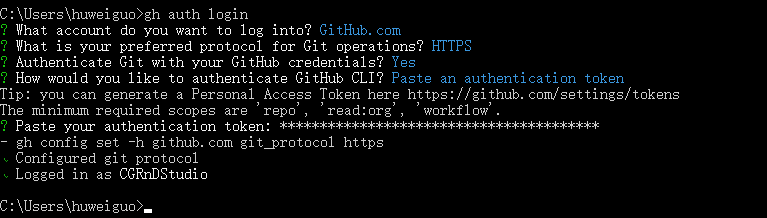
在选择Paste an authentication token之后,首先你需要网页端登陆www.github.com
找settings>Developer settings>Personal access tokens>Generate new token,勾选所有选项创建即可
参考文档